It's WordPress accessibility, done right.
Accessibility tools can be found in a few places right now. Most promise quick fixes. Some promise legal protection. Very few actually help people to use your website.
Bnode’s WordPress accessibility plugin tool is different.
It is built specifically for WordPress sites. No generic overlays. No automated shortcuts pretending to be compliant. A practical, affordable tool backed by real people who understand accessibility, WordPress, and the realities of running a website.
Most accessibility tools are built to work “everywhere”.
That can mean they’re not truly designed for anywhere.
“A proclaimed cure-all, cures nothing”
Designed for WordPress. Not bolted on.
Our tool is WordPress-only by design.
That gives us and you complete control over how it integrates, performs, and behaves alongside your theme, plugins, and content. That means you get :
Lightweight, performance friendly
scripts that keep your site fast.
Accessibility features tailored to your site,
not generic overlays
Clear, predictable behaviour that works
properly with your existing setup
Built to work with ‘out of the box’
WordPress, not around it
Accessibility is not a widget.
It's a responsibility.
A lot of accessibility tools lean heavily on automation. Sliders, toggles, AI
promises, and legal reassurance. But accessibility is not something you
just switch on.
At Bnode, every installation is reviewed by a dedicated technical team.
We assess whether the tool is fit for purpose on your site and configured
correctly for your content, structure, and fit for purpose for your users.
You are not left alone with a dashboard and a hope that it works.

This Wordpress accessibility tool plugin is right for you if:
If you want a magic button that makes your site fully accessibility compliant overnight, this probably is not it, as that doesn’t exist.
If you want a solid, responsible accessibility solution built for WordPress, backed by people who know what they are doing, you are in the right place.
If your WordPress website is running the latest stable releases (currently WordPress 6.9) which continues to build on the platform’s long-standing accessibility improvements and standards compliance, the Bnode accessibility tool plugs right in and complements that foundation.
WordPress has steadily improved accessibility across its core and block editor to align with international guidelines such as WCAG, giving you a strong base to build on.
Because our tool is designed specifically for WordPress, it works smoothly with the latest WordPress updates and with popular plugins like WooCommerce, the leading ecommerce solution for WordPress sites.
WooCommerce itself is committed to accessibility and its recent versions aim for WCAG conformance on the front end, so pairing it with a purpose-built accessibility tool makes your site more inclusive and user-friendly.
Where many other providers treat WordPress like just another platform, Bnode’s tool is crafted for WordPress environments, tested by our technical team for fitness on your live site, and fully compatible with WooCommerce and a wide range of other plugins. That means you get a solution that genuinely works with your setup, not around it, and without unnecessary limits on users, pages, or visitors.
Some accessibility tools out there lean on what critics call gimmicks, like overlay widgets, magic buttons or one-line-of-code scripts that claim to make your site accessible instantly. In reality these kinds of overlays often sit on top of your content without fixing the real structural issues beneath. They can give you a false sense of compliance, do not touch underlying code, and in some cases can even interfere with the assistive technologies that people with disabilities rely on, such as screen readers or keyboard navigation tools.
When you have purchased the Bnode plugin, our team will manually review your website within 7 working days to review the plugin in action.
If any elements of the plugin are NOT working as intended, we will contact you to ensure that you have followed the documentation that you receive when downloading the plugin.
If you (or your web developer) require further support, for example due to bespoke coding on your WordPress website, we will discuss the options with you to help you get the plugin up functioning as intended.
If however, you refuse to make the plugin fit-for-purpose after 30 days from the date of purchase, we will thank you for your interest, remove your license, and either refund you additional months that you have paid for, OR simply not change you for future months.
This process is designed to ensure that the quality of Bnode’s accessibility tool remains of the highest standard, and is fit-for-purpose for your website users that will benefit from it as such.
Our prices reflect out ethos, that accessibility should be the ‘norm’ when it comes to websites. It’s because of this that we have chosen to make the Bnode Accessibility Tool as affordable as possible, no matter the business or website owner’s financial situation.
For us, this is not about making as much money as possible.
It’s about making change, and that change being a change for good.
We have provided a table of features for you to compare and contrast the Bnode accessibility WordPress plugin against the few companies out there that are offering their kind of overlays.
Along with the download of our WordPress accessibility Plugin, you will be provided with an accessibility statement that you can add to your websites current Terms and conditions or accessibility statement.
Within this it will explain what the plugin is doing towards helping you to reach your WCAG, ADA or EAA compliance goals.
Simple, to the point, and clear.
Plugin Features
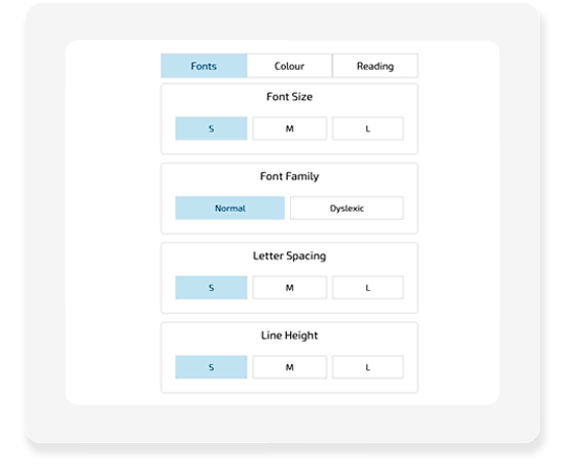
4 Font functions:
Your users can simply select the + and – buttons to change the font size.
They can also change the whole website to a more Accessible friendly font face.
There are also several sizes of Letter spacing and Line height adjustments that they can choose from to suit their needs.
These features are ideal for Dyslexic users, those that are visually impaired, and those that find certain fonts confusing to read.
4 Colour functions
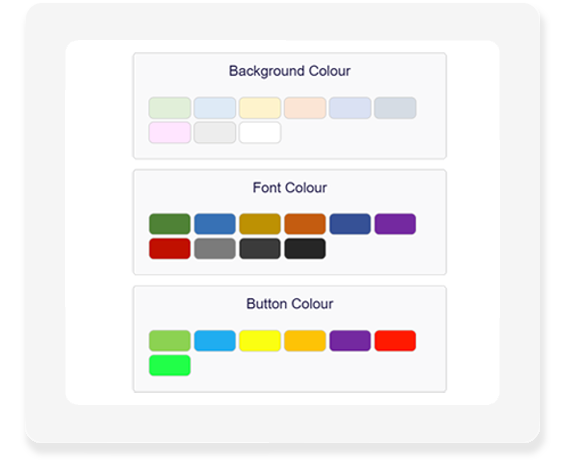
A simple layout for Background, Font and Button colours, with different colours to suit your users specific needs.
Not just 2 or 3 pre-sets, our unique, and intuitive system automatically checks in live-time your chosen colours against each other, and modifies them slightly to be WCAG 2.2 visual impairment friendly.
This tool finishes off with a dark-mode toggle switch, helping to prevent overwhelm from too much visual stimulation , glare, and also as an added bonus is a reduced level of energy for your monitors, helping you to reduce your digital carbon footprint when it is toggled on.
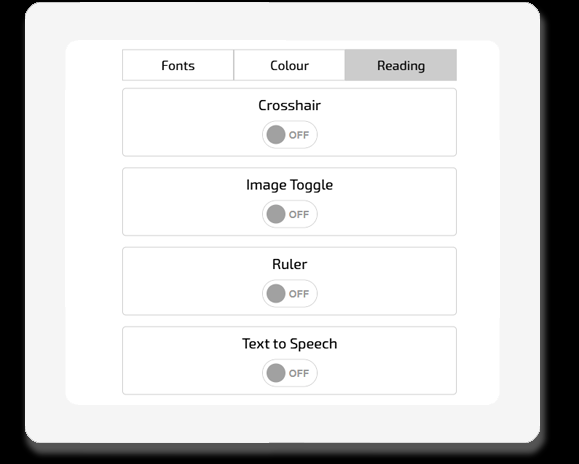
4 Reading functions:
Toggle the crosshair switch on and off to have it follow your mouse around on desktop, or on mobile, tap anywhere on the page and scroll up and down. Ideal for Dyslexic users to keep track of where they are reading.
You also get an image toggle so your users can have less distractions on the page when digesting large amounts of text.
Thirdly, you have a ‘ruler’ function that highlights just a few rows & dims the rest of the screen so yout users can focus on the area that they’re reading.
Finally (for now), we have a ‘Text to speech’ function that enables your browser based voices as an audio output for page content.
Full list of features and like-for-like package comparisons
In the interest of courtesy, we have not named these other companies accessibility tools, however this information can be made available if requested.
Plugin font changes
Plugin colour changes
Auto WCAG colour check & amend
Plugin reading tools
Fit for Purpose check
Technical Support service
Installation docs & email support
Social Media inclusion templates
Accessibility statement
Size / Page views / User limitations
Time to implement
Price Per Month plan
Price Per Year plan
Bnode Plugin

Yes
Yes
Yes
Yes
Yes
Yes +Costs
Yes
Yes: 28
Yes
No
minutes / few hours
£25
£225
Company 2
Yes
Yes
No
Yes
No
Yes +Costs
Yes
No
Yes
Yes, up to 5k visits per month
minutes / few hours
$59
$490
Company 3
Yes
Yes
No
Yes
No
Yes +Costs
Yes
No
No
Yes
1 month
N/A Yearly subscription
Bespoke quote: £1,500 +
Company 4
Yes
Yes
No
Yes
No
Yes +Costs
Yes
No
Yes
Yes, up to 100K visits per month
minutes / few hours
$49
$490


At just £25 per month or £270 per year - * Saving you 10%
What are you waiting for?
• No hidden fees or minimum terms
• No limits, and no surprises
• Our pricing is a simple monthly, quarterly or yearly cost.
Download the Bnode Accessibility plugin today, because Accessibility should be normal. Not complicated.
Got a Question? We're here to help.
Feel free to pop a message below and we will get in touch with you ASAP.