It's WordPress accessibility, done right.
Accessibility tools can be found in a few places right now. Most promise quick fixes. Some promise legal protection. Very few actually help people to use your website.
Bnode’s WordPress accessibility plugin tool is different.
It’s built specifically for WordPress sites. No generic overlays. No automated shortcuts pretending to be compliant. A practical, affordable tool backed by real people who understand accessibility, WordPress, and the realities of running a website.

Most accessibility tools are built to work “everywhere”.
That can mean they’re not truly designed for anywhere.
“A proclaimed cure-all, cures nothing”
Designed for WordPress. Not bolted on.
Our tool is WordPress-only by design.
That gives us and you complete control over how it integrates, performs, and behaves alongside your theme, plugins, and content. That means you get :
At just 350Kb: Lightweight
code that keeps your site fast.
Accessibility features tailored to your site,
not generic overlays.
Compatible with Elementor, Divi
WPBakery and other Major themes.
Built to work with ‘out of the box’
WordPress, not around it.
Accessibility is not a widget.
It's a responsibility.
A lot of accessibility tools lean heavily on automation. Sliders, toggles, AI
promises, and legal reassurance. But accessibility is not something you
just switch on.
At Bnode, every installation is reviewed by a dedicated technical team.
We assess whether the tool is fit for purpose on your site and configured
correctly for your content, structure, and fit for purpose for your users.
You are not left alone with a dashboard and a hope that it works.
This Wordpress accessibility tool plugin is right for you if:
If you want a magic button that makes your site fully accessibility compliant overnight, this probably is not it, as that doesn’t exist.
If you want a solid, responsible accessibility solution built for WordPress, backed by people who know what they are doing, you are in the right place.
If your WordPress website is running the latest stable releases (currently WordPress 6.9) which continues to build on the platform’s long-standing accessibility improvements and standards compliance, the Bnode accessibility tool plugs right in and complements that foundation.
WordPress has steadily improved accessibility across its core and block editor to align with international guidelines such as WCAG, giving you a strong base to build on.
Because our tool is designed specifically for WordPress, it works smoothly with the latest WordPress updates and with popular plugins like WooCommerce, the leading ecommerce solution for WordPress sites.
WooCommerce itself is committed to accessibility and its recent versions aim for WCAG conformance on the front end, so pairing it with a purpose-built accessibility tool makes your site more inclusive and user-friendly.
Where many other providers treat WordPress like just another platform, Bnode’s tool is crafted for WordPress environments, tested by our technical team for fitness on your live site, and fully compatible with WooCommerce and a wide range of other plugins. That means you get a solution that genuinely works with your setup, not around it, and without unnecessary limits on users, pages, or visitors.
There is no “one-click compliance” when it comes to accessibility, and we want to be open, honest and transparent about that with you, and for you to be open with your website visitors.
Some accessibility tools out there lean on what critics call gimmicks, like overlay widgets, magic buttons or one-line-of-code scripts that claim to make your site accessible instantly. In reality these kinds of overlays often sit on top of your content without fixing the real structural issues beneath. They can give you a false sense of compliance, do not touch underlying code, and in some cases can even interfere with the assistive technologies that people with disabilities rely on, such as screen readers or keyboard navigation tools.
Accessibility tools can improve usability, but they should support accessible development, and in the long term, not replace it.
Any companies that are promising a kind of OneTap solution to accessibility with their tools are not being honest as tools do not cover points like:
• Proper semantic HTML.
• Keyboard navigation.
• Alt text.
• Form labels.
• Accessible PDF’s.
• Colour contrast in initial design.
• Screen reader compatibility testing.
• Manual accessibility audits.
• User testing with disabled users.
Which kinds of people will actually benefit from your accessibility tools.
Features May Help Users With:
Font size increasing – Visual impairments.
Increased line height and letter spacing – Cognitive accessibility.
Dyslexia friendly font – Dyslexia and reading fatigue.
Colour controls – Colour blindness and low vision.
Dark mode – Light sensitivity, migraines, Overwhelm.
Reading ruler – ADHD, dyslexia, cognitive processing.
Text-to-speech – Visual impairments, reading difficulties / Dyslexia.
When you have purchased the Bnode plugin, our team will manually review your website within 21 working days to review the plugin in action, or when you submit it for us to review prior to that deadline.
If any elements of the plugin are NOT working as intended, we will contact you to ensure that you have followed the documentation that you receive when downloading the plugin.
If you (or your web developer) require further support, for example due to bespoke coding on your WordPress website, we will discuss the options with you to help you get the plugin up functioning as intended.
If however, you refuse to make the plugin fit-for-purpose after 30 days from the date of purchase, we will thank you for your interest, remove your license, and either refund you additional months that you have paid for, OR simply not change you for future months.
This process is designed to ensure that the quality of Bnode’s accessibility tool remains of the highest standard, and is fit-for-purpose for your website users that will benefit from it as such.
Our prices reflect out ethos, that accessibility should be the ‘norm’ when it comes to websites. It’s because of this that we have chosen to make the Bnode Accessibility Tool as affordable as possible, no matter the business or website owner’s financial situation.
For us, this is not about making as much money as possible.
It’s about making change, and that change being a change for good.
We have provided a table of features for you to compare and contrast the Bnode accessibility WordPress plugin against the few companies out there that are offering their kind of overlays.
Along with the download of our WordPress-specific accessibility plugin, you will be provided with an accessibility statement that you can add to your websites current Terms and conditions or accessibility statement.
Within this it will explain what the plugin is doing towards helping you to reach your WCAG, ADA or EAA compliance goals.
Simple, to the point, and clear.
Understanding WCAG Accessibility Standards.
Although the UK doesn’t fully regulate digital accessibility, even in it’s Equality Act of 2010, it does have compliance guidelines called WCAG (Web Content Accessibility Guidelines.) They are a set of recommendations for improving web accessibility for people with additional needs.
It is worth noting that Public Sector regulations insist that WCAG is followed when producing assets for them, and that you must be showing your understanding of this when dealing with them.
Accessibility and UK, ADA and EAA Legal Requirements.
Even if you are based in the UK where digital accessibility is not legislated as much as it should be, if you deal with companies in America, or the EU, then you have to abide by their regulations.
America have ADA; the Americans with Disabilities Act.
The EU has the EAA, the European Accessibility Act.
As previously mentioned, there is no ‘OneClick’ or ‘OneTap’ solution when it comes to accessibility compliance, however our inclusive tool can be a step towards achieving those goals.
The Bnode plugin has been coded with digital sustainability in mind and is therefore at around only 350Kb in file size when installed.
This is so small that any website page speed performance changes would be negligible if even noticeable at all.
As it is designed to work with WordPress, conflicts such as breaking page layouts should not be the case, and even if a developer has used odd, or outdated methods of building your website, there are places within the admin for the Bnode accessibility plugin to allow modifications easily.
Plugin Features
4 Font functions:
Your users can simply select the + and – buttons to change the font size.
They can also change the whole website to a more Accessible friendly font face.
There are also several sizes of Letter spacing and Line height adjustments that they can choose from to suit their needs.
These features are ideal for Dyslexic users, those that are visually impaired, and those that find certain fonts confusing to read.
4 Colour functions
A simple layout for Background, Font and Button colours, with different colours to suit your users specific needs.
Not just 2 or 3 pre-sets, our unique, and intuitive system automatically checks in live-time your chosen colours against each other, and modifies them slightly to be WCAG 2.2 visual impairment friendly.
This tool finishes off with a dark-mode toggle switch, helping to prevent overwhelm from too much visual stimulation , glare, and also as an added bonus is a reduced level of energy for your monitors, helping you to reduce your digital carbon footprint when it is toggled on.

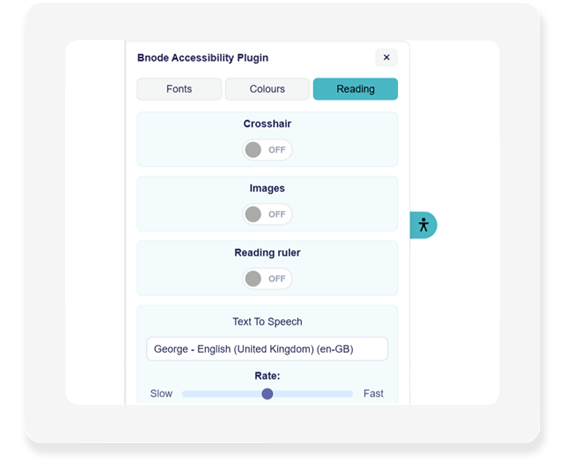
4 Reading functions:
Toggle the crosshair switch on and off to have it follow your mouse around on desktop, or on mobile, drag it anywhere on the page and scroll up and down. Ideal for Dyslexic users to keep track of where they are reading.
You also get an image toggle so your users can have less distractions on the page when digesting large amounts of text.
Thirdly, you have a ‘ruler’ function that highlights just a few rows & dims the rest of the screen so your users can focus on the area that they’re reading.
Finally (for now), we have a ‘Text to speech’ function that enables your browser based voices as an audio output for page content.
Full list of features and like-for-like package comparisons
Out of courtesy, we haven’t identified the other accessibility tools by name – only by their logos. However, for full disclosure and transparency on feature and pricing comparison, this information can be made available to you on request.
Plugin font changes
Plugin colour changes
Auto WCAG colour check & amend
Plugin reading tools
Fit for Purpose check
Home Page accessibility Audit
Technical Support service
Installation docs & email support
Social Media inclusion templates
Accessibility statement
Size / Page views / User limitations
Time to implement
Price Per Month plan
Price Per Year plan
Bnode Plugin

Yes
Yes
Yes
Yes
Yes
Yes
Yes +Costs
Yes
Yes: 28
Yes
No
minutes / few hours
£25
£270
Company 2
Yes
Yes
No
Yes
No
No
Yes +Costs
Yes
No
Yes
Yes, up to 5k visits per month
minutes / few hours
$59
$490
Company 3
Yes
Yes
No
Yes
No
No
Yes +Costs
Yes
No
No
Yes
1 month
N/A Yearly subscription
Bespoke quote: £1,500 +
Company 4
Yes
Yes
No
Yes
No
No
Yes +Costs
Yes
No
Yes
Yes, up to 100K visits per month
minutes / few hours
$49
$490


At £25 per month or £270 per year (Saving you 10%)
What are you waiting for?
• One-off £50 for the product, assets, and to cover the audits.
• Then pricing is a simple monthly, quarterly or yearly ongoing.
• No additional hidden fees or minimum terms.
• No limits, and no surprises.
Download Bnode’s WordPress-specific Accessibility plugin today – because Accessibility should be straightforward, not complicated.
Got a Question? We're here to help.
Feel free to pop a message below and we will get in touch with you ASAP.